Enterprise
Enterprise deployment, security controls, and Group Policy management for DriveLink.
DriveLink Enterprise Toolkit is designed for Windows-first IT teams that need reliable SSH/SFTP drive access with policy control, repeatable deployment, and a clear security model. The goal is to let administrators define what must stay consistent across the organization while still letting users authenticate with their own credentials.
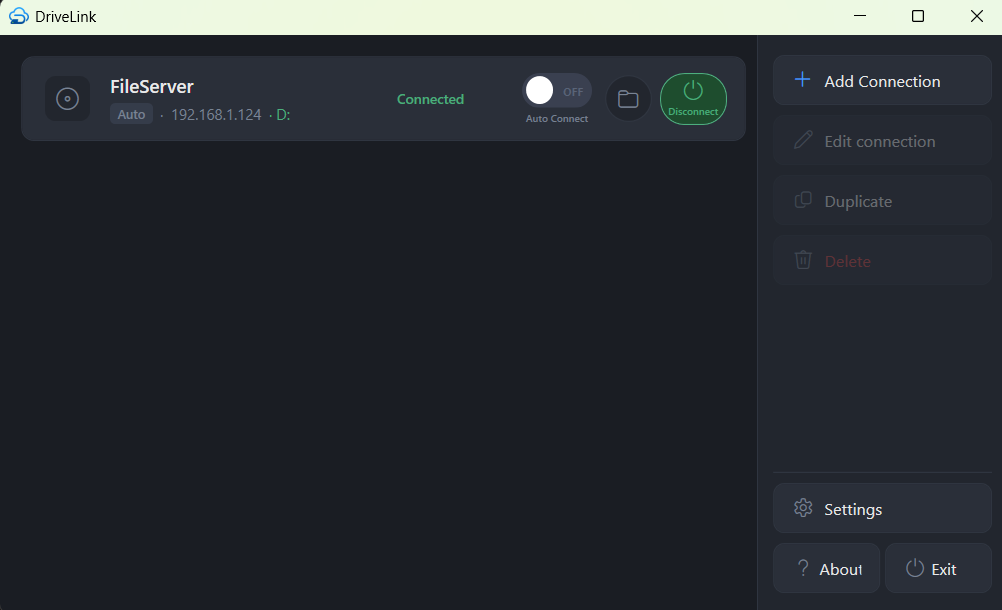
What enterprise teams get starts with control of system connections. Administrators can deploy centrally managed connection definitions that users can mount but cannot edit or delete. This significantly reduces endpoint drift and prevents common support issues caused by manual per-user connection setup.
The toolkit also includes ADMX policy templates for native Group Policy administration, remote ConfigUrl support for centralized configuration updates, MSI install-time properties such as APPNAME, and white-label branding fields including AppName, AppIcon, AboutText, and SupportUrl.
Compared with SSHFS-Win Manager, DriveLink is built around managed Windows operations: system connections, per-user credentials on those connections, host-key trust, redacted support details, and deployment through the tools IT teams already use.
Deployment with enterprise tooling
DriveLink is built to fit existing endpoint deployment workflows rather than forcing a separate management plane. Teams can deploy with Configuration Manager (ConfigMgr/SCCM), Intune Win32 apps, PDQ Deploy, or other MSI-capable software distribution systems.
For full silent installation with prerequisites, use the bootstrapper:
DriveLink.Bundle.exe /install /quiet /norestart
If WinFsp is already present, teams can deploy MSI directly:
msiexec /i DriveLink.Installer.msi /qn /norestart
Both patterns align cleanly with enterprise rollout rings, pilot groups, and staged updates. Configuration can be delivered through system.json, registry preferences, or a secure remote configuration endpoint, depending on how centralized your operating model is.
Security and policy model
Security is built around clear separation of responsibilities. IT controls endpoints and policy, while users provide credentials within their own profile scope. This prevents central configuration from becoming a credential store and keeps user secrets out of shared deployment artifacts.
Credential data is encrypted at rest using Windows-bound protection, and policy-controlled values can be enforced from HKLM\SOFTWARE\Policies\DriveLink. Those enforced policy values take precedence over preference-level settings, giving administrators deterministic behavior across managed endpoints.
For organizations with strict governance requirements, this makes change control easier: policy enforces the operating baseline, and preference settings can still be used for controlled flexibility where appropriate.
Host-key fingerprints can be pre-seeded in system connections, remote config, or registry connections. Users can also test a connection and verify the received fingerprint before the first mount.
Group Policy (GPO) focus
DriveLink includes ADMX templates so settings are managed through the standard Group Policy administrative interface. This allows IT teams to configure branding, support links, endpoint behavior, and connection policy without custom scripts.
Common GPO-driven scenarios include:
- Enforcing application branding and support metadata.
- Controlling drive-letter override behavior.
- Hiding Linux-style dot files on mounted drives (
HideDotFilespolicy). - Setting
ConfigUrlfor centrally hosted connection definitions. - Standardizing behavior across business units and site locations.
For support workflows, DriveLink keeps short-lived redacted logs under the user’s profile and includes a Copy Support Details action. The copied report includes app, Windows, WinFsp, selected connection, and recent log context without passwords or passphrases.
Because policy values are in the standard policy hive, they are easy to audit, document, and align with existing GPO governance practices.
Pricing
Enterprise Toolkit is $499 one-time perpetual per organization and includes 1 year of free updates. Ongoing update access is available at $99/year, which includes basic email support with a response target within 3 business days.
For teams that need faster and broader support coverage, Enterprise Support is available at $99/month and includes email and phone support with a next-business-day response target.
For service providers and product vendors, MSP/OEM and embedded white-label options are available on the Pricing page.
What you get
When you order Enterprise Toolkit, you receive:
- MSI installer for managed deployment workflows.
- Bundle EXE installer for full install flow with dependency handling.
- ADMX template pack for Group Policy-based configuration and enforcement.
- Documentation with detailed packaging and deployment instructions for enterprise rollout tools.
- Detailed configuration and management documentation covering system connections, policy settings, and operational management patterns.
See full details in Pricing: Enterprise Toolkit.
Related options: