SSH Windows Drive

DriveLink logoDriveLink

Turn SSH/SFTP servers into local Windows drive letters with secure, native desktop access.

Source Available with enterprise deployment options.

Native drive mapping

Mount SFTP endpoints as drive letters that work in Explorer and standard desktop apps.

Secure authentication

Use passwords or SSH keys, including passphrase-protected private keys.

Built for operations

Silent install support and predictable upgrade behavior for managed Windows fleets.
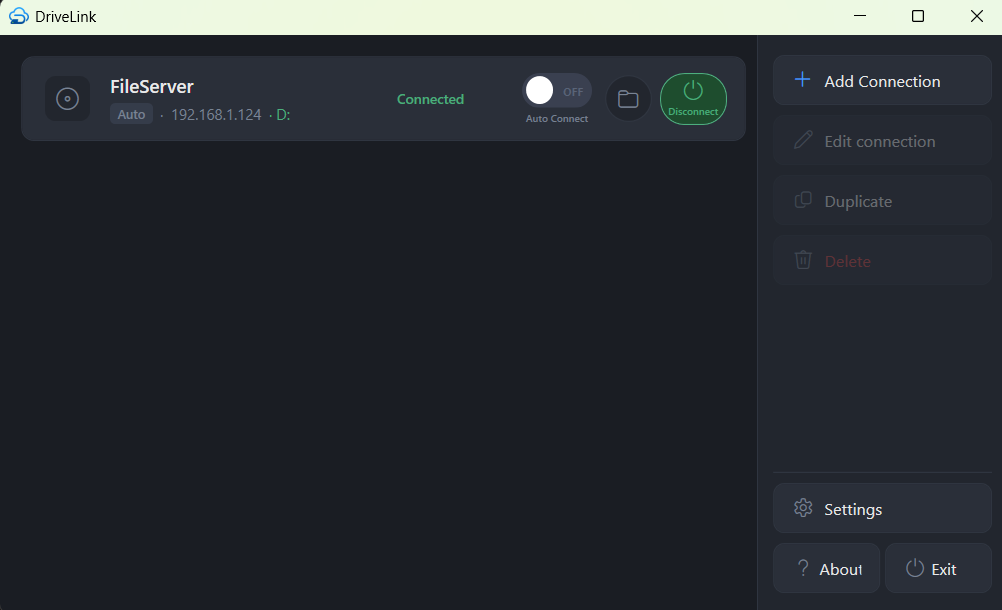
DriveLink main application interface
Main connection view in the desktop app.

For Enterprise Teams

Built for IT-managed SSH/SFTP access at scale

Replace ad-hoc endpoint setup with policy-driven connection management, enterprise deployment compatibility, and white-label options.

Lower support load

IT-locked system connections reduce endpoint drift and simplify user onboarding.

Fit existing tooling

MSI and quiet-install workflows align with standard endpoint management pipelines.

Commercial flexibility

Enterprise Toolkit, MSP/OEM, and embedded white-label licensing paths support different operating models.

DriveLink is a Windows-native SFTP drive mapper built for teams that need reliable desktop behavior and enterprise control.

Individual license · $9.99 one-time — includes the installer bundle, WinFsp auto-setup, and one year of updates.

Buy individual license · View pricing · Build it yourself

Free alternative: build it yourself from source — all code is public under the PolyForm Perimeter License 1.0.0.

What is SFTP (and what is an SSH Windows Drive)?

SFTP means SSH File Transfer Protocol. It uses SSH encryption to securely move and browse files on a remote server.

When people say “SSH Windows Drive,” they usually mean:

  • Connect to an SSH/SFTP server.
  • Mount it as a normal drive letter like P:\ or S:\.
  • Use it in Explorer and any Windows app like a local drive.

DriveLink does exactly that, without requiring users to work in terminal commands.

Not to be confused with FTPS.

Pricing model

  • Free (Core): Open Core model (build project and installers yourself), SFTP mapping, unlimited user connections, DPAPI credential storage, tray auto-connect, and no support.
  • Individual Supporter (Individual Use Only): for up to 5 computers, includes access to MSI + Bundle installers (Bundle can install dependencies). $9.99 one-time includes 1 year of updates with no support; $2.99/month includes updates and support (email support with a 5-business-day response target).
  • Enterprise Toolkit: $499 one-time perpetual per organization with 1 year of free updates.
  • Software Assurance: $99/year with update entitlement plus basic email support (response target within 3 business days).
  • Enterprise Support: $99/month for email and phone support with next-business-day response target.
  • MSP/OEM: $1,200/year or negotiated perpetual with redistribution rights.

See full plan details on the Pricing page.

What makes it practical in daily use

  • Drive-letter mounting that works naturally in Explorer and save dialogs.
  • Lower runtime overhead than browser-wrapper desktop tools.
  • Per-connection control for drive letters, naming, and startup behavior.
  • Predictable tray-first workflow for users who keep file access always available.
  • Test Connection diagnostics, duplicate connection, advanced mount settings, and copyable support details.

SSHFS-Win Manager is a helpful GUI for SSHFS-Win. DriveLink is aimed at users and IT teams who want a more Windows-native replacement story:

  • Stored secrets protected with Windows user-scope DPAPI.
  • SSH host-key pinning with visible trusted and received fingerprints.
  • Bundled WinFsp setup flow for easier first installation.
  • Native tray app with per-connection auto-connect and connection testing.
  • Redacted local logs and support details users can copy for IT.
  • Enterprise system connections, Group Policy, Intune-friendly rollout, remote config, and branding.

The tradeoff is focus. DriveLink exposes common advanced settings directly, including read-only mounts, cache duration, timeouts, dot-file behavior, and volume labels. It does not yet expose every raw SSHFS command-line option.

Security model designed for Windows endpoints

  • Password and SSH private-key authentication, including passphrase-protected keys.
  • Sensitive credentials encrypted at rest with Windows user and machine scope.
  • Optional ask-at-connect mode when users do not want a secret saved.
  • SSH host-key pinning to reduce server impersonation risk.
  • Credential storage split from centrally managed endpoint definitions.
  • In-process operation that reduces secret exposure through child-process argument passing.

Performance characteristics users notice

  • Faster folder browsing behavior through short-lived metadata caching.
  • Reduced repeated round-trips during file attribute checks.
  • Responsive connection lifecycle behavior during connect/disconnect operations.
  • Stable experience for common office workflows: browse, open, edit, save, repeat.

IT operations advantages

  • Quiet install and upgrade support for standard endpoint deployment workflows.
  • Prerequisite chaining in the bootstrapper for cleaner first-time setup.
  • Policy-oriented connection management for centrally defined endpoints.
  • Branding customization support for managed internal distribution.

Capability overview

Capability Open Source Commercial DriveLink
App stack Often NodeJS/Vue wrappers around native tools Usually mixed native + cloud services Native .NET 8 desktop app
Open-source model Common Rare Source-available (PolyForm Perimeter 1.0.0)
Native Windows policy integration Limited Usually limited Strong
IT-locked system connections Rare Inconsistent Supported
Credential protection at rest Varies widely Varies by vendor Windows user/machine-bound protection
Local desktop management without external portal Inconsistent Rare Supported
White-label runtime branding Rare Rare Supported
Offline or air-gapped friendly workflows Limited Commonly unavailable Supported
Installer/rollout fit for endpoint tooling Varies Often EXE-first MSI + bootstrapper support
SFTP-focused operational depth Moderate Broad but generalized Strong

Best-fit scenarios

DriveLink is typically the right choice when your team needs one or more of the following:

  • SFTP as the primary transfer protocol for production operations.
  • Windows fleet rollout through existing endpoint tooling.
  • Controlled server endpoints with user-provided credentials.
  • Predictable local-drive behavior for legacy or line-of-business software.

Not optimized for every use case

DriveLink is intentionally focused. If your immediate requirement is broad multi-protocol cloud storage aggregation, a generalized cloud connector may be a better short-term fit. DriveLink prioritizes SFTP depth, policy control, and managed Windows deployment quality.

Deployment summary

  1. Deploy package through existing enterprise software distribution.
  2. Apply baseline endpoint policy and optional branding.
  3. Assign users to approved SFTP endpoints.
  4. Validate first-run and credential enrollment.
  5. Roll out in phased waves by team or business unit.